
WPLocation Review: WordPress Geolocation Plugin Tested
A detailed first-party WPLocation review with local tests, original screenshots, setup guides, Pro features, add-ons, pricing and deployment advice.
Ownership and testing disclosure: TechAbout is the company behind WPLocation. This is our first-party, AI-assisted technical evaluation, not an independent customer endorsement. Screenshots come from a fresh local WordPress installation using demonstration content and a synthetic country database. No real license key, customer data or tracking account appears in them.
Cover: original AI-generated editorial illustration for TechAbout. Product screenshots: TechAbout local review lab.
WPLocation is a WordPress geolocation plugin for deciding which visitors can see particular content, products and regional experiences. Its strongest idea is a shared country engine: configure the source once in Free, then use that country decision across content rules, WooCommerce restrictions, redirects, campaigns and optional add-ons.
This WPLocation review examines the actual released software, explains what each package does, and walks through installation and everyday workflows. The verdict is conditional: WPLocation is useful for country-based publishing and commerce when you can maintain the location source and test your cache. It needs more infrastructure work than a simple content switch, and its country decisions should never be mistaken for identity verification.
WPLocation review: the verdict and what we tested
The product works best as a focused country-personalization layer for WordPress. Free covers editorial visibility; Pro adds store and regional-experience controls; the three separate add-ons address specialist workflows. The installed interfaces make those responsibilities understandable, although the number of settings means that a site administrator should plan a staging test rather than activate everything at once.
Our local environment ran WordPress 7.1.3, PHP 8.3.35, MariaDB 13.0.2, WooCommerce 11.2.1 and Formidable Forms 7.0. We installed WPLocation Free 1.1.9, Pro 1.4.4, Agency Toolkit 1.0.1, Affiliate Links 1.0.0, CloudFront Country Source 1.0.1 and Upgrade Assistant 1.0.0 from the release packages. The six WPLocation ZIP checksums matched the project's current release manifest.
Testing produced 51 passing local integration checks and 18 passing anonymous HTTP checks. Among the observed results: a restricted product returned HTTP 200 for the simulated US visitor and 404 for UK and unknown visitors; a US regional rule returned a 302 redirect to its saved destination; country campaigns selected the appropriate offer; unknown visitors received the campaign default; and Affiliate Links returned the configured country URL or direct default. Agency Toolkit applied and restored one local rule change. A published Formidable form rendered through a campaign shortcode.
These checks demonstrate behavior under controlled inputs. They do not measure real-world country accuracy or load capacity. We did not place a paid order, activate a production license, test a renewal, submit a real customer form, or configure a live AWS distribution. External requests were disabled in the local lab; the Pro license remained visibly inactive. The pricing and plan inclusions below were checked against the live website on October 31, 2026.
What stood out
- One shared source: content and Pro workflows build on Free's country engine.
- Explicit fallback behavior: campaigns require a default, and affiliate links keep a direct default destination.
- Practical operational controls: saved-rule previews, diagnostics, aggregate retention settings and reviewed rule transfers are present in the installed software.
- Clear boundaries: Markets does not silently claim to become a currency, tax or translation engine.
What requires care
- Full-page caching: a cached response can bypass country decisions and show another audience's page.
- Unknown countries: restricted content can disappear when the source cannot resolve a visitor.
- Multiple packages: Free must remain active alongside Pro, and separate add-on ZIPs have their own installation and update steps.
- Deployment-specific compatibility: local results cannot establish compatibility with every theme, checkout extension, reverse proxy or CDN.
Free, Pro, Agency and add-ons: what is actually included?
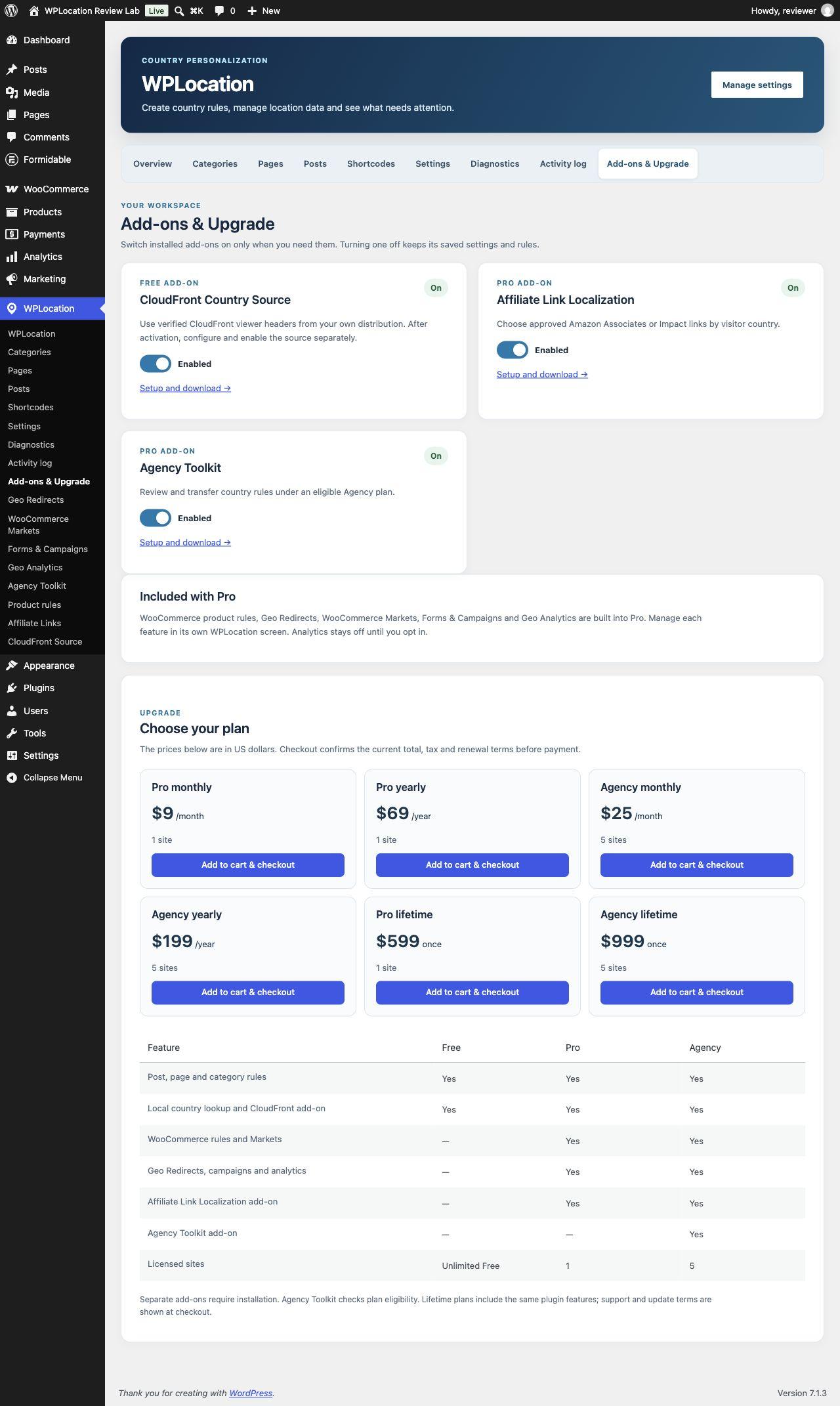
WPLocation.com distributes a free base plugin and a separate Pro extension. Pro does not replace Free. Keep both installed and active. Free supplies the country engine and editorial rules; Pro consumes that foundation. Agency is a license tier using the same Pro feature set, with a larger site allowance and the separate Agency Toolkit entitlement.
| Package or feature | Role | Delivery |
|---|---|---|
| WPLocation Free 1.1.9 | Post, page and post-category audiences; visibility block; shortcodes; country-source settings and diagnostics | Base plugin ZIP |
| WPLocation Pro 1.4.4 | WooCommerce product/category restrictions, Geo Redirects, WooCommerce Markets, Forms & Campaigns, Geo Analytics | Paid extension ZIP; Free required |
| Affiliate Link Localization 1.0.0 | Country alternatives for publisher-supplied Amazon Associates and Impact URLs | Separate ZIP included with current paid plans |
| Agency Toolkit 1.0.1 | Reviewed transfer of supported country rules between sites | Separate ZIP with Agency subscriptions and both lifetime plans |
| CloudFront Country Source 1.0.1 | Optional trusted viewer-country source for your own CloudFront distribution | Separate free ZIP; use current website Free |
| Upgrade Assistant 1.0.0 | Preparation for older standalone installations | Migration utility, not an everyday personalization feature |
The distinction matters when buying. Geo Redirects, Markets, Forms & Campaigns and Geo Analytics are already inside Pro 1.4.4; they are not four additional purchases. By contrast, installing Pro does not automatically install the three separate add-ons. The live add-on catalog distinguishes those downloads from roadmap items.
How to install WPLocation Free, Pro and the add-ons
Start on a staging copy with a recoverable database and file backup. The current Pro requirements are WordPress 6.8 or newer and PHP 8.3 or newer, plus a compatible Free base. Our review uses the website Free 1.1.9 package. WooCommerce is necessary for the store features, while Formidable Forms is necessary only when a campaign displays a Formidable form.
- Download the base ZIP from the official WPLocation Free page.
- In WordPress, open Plugins → Add Plugin → Upload Plugin, upload the ZIP, then install and activate it.
- Obtain the Pro ZIP from your purchase receipt or WPLocation account. Upload and activate it while Free remains active.
- Open WPLocation → Settings and configure a supported country source before adding restrictions.
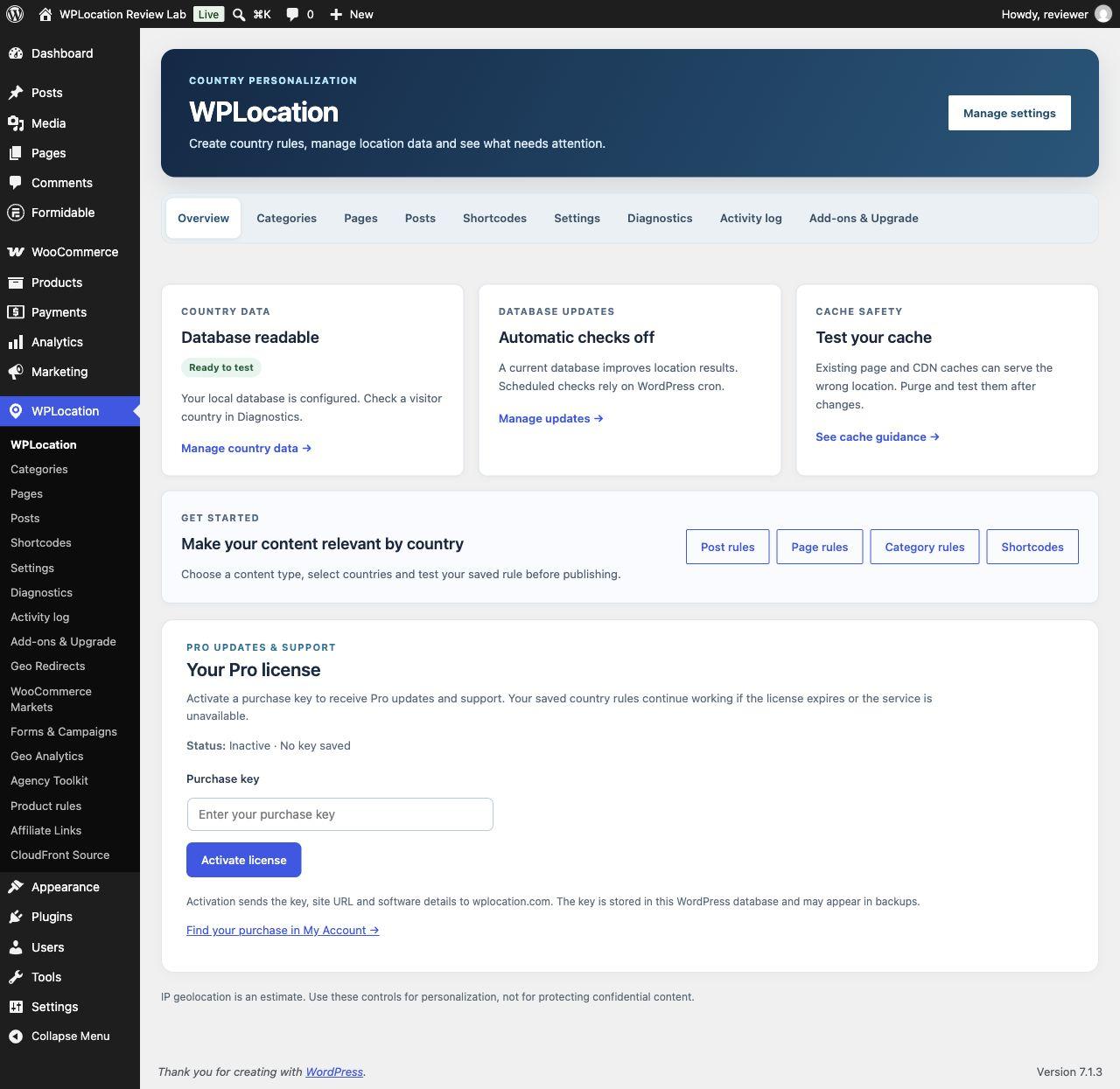
- Enter your own purchase key in the Pro license panel on the WPLocation overview to request updates and support. Keep the key out of screenshots, public tickets and shared exports.
- Download any entitled add-on ZIPs from your account and install each separately. Install the free CloudFront source only if you operate the corresponding infrastructure.
- Check Diagnostics, save one small rule, test allowed and disallowed visitors, then test the same route through your actual cache.
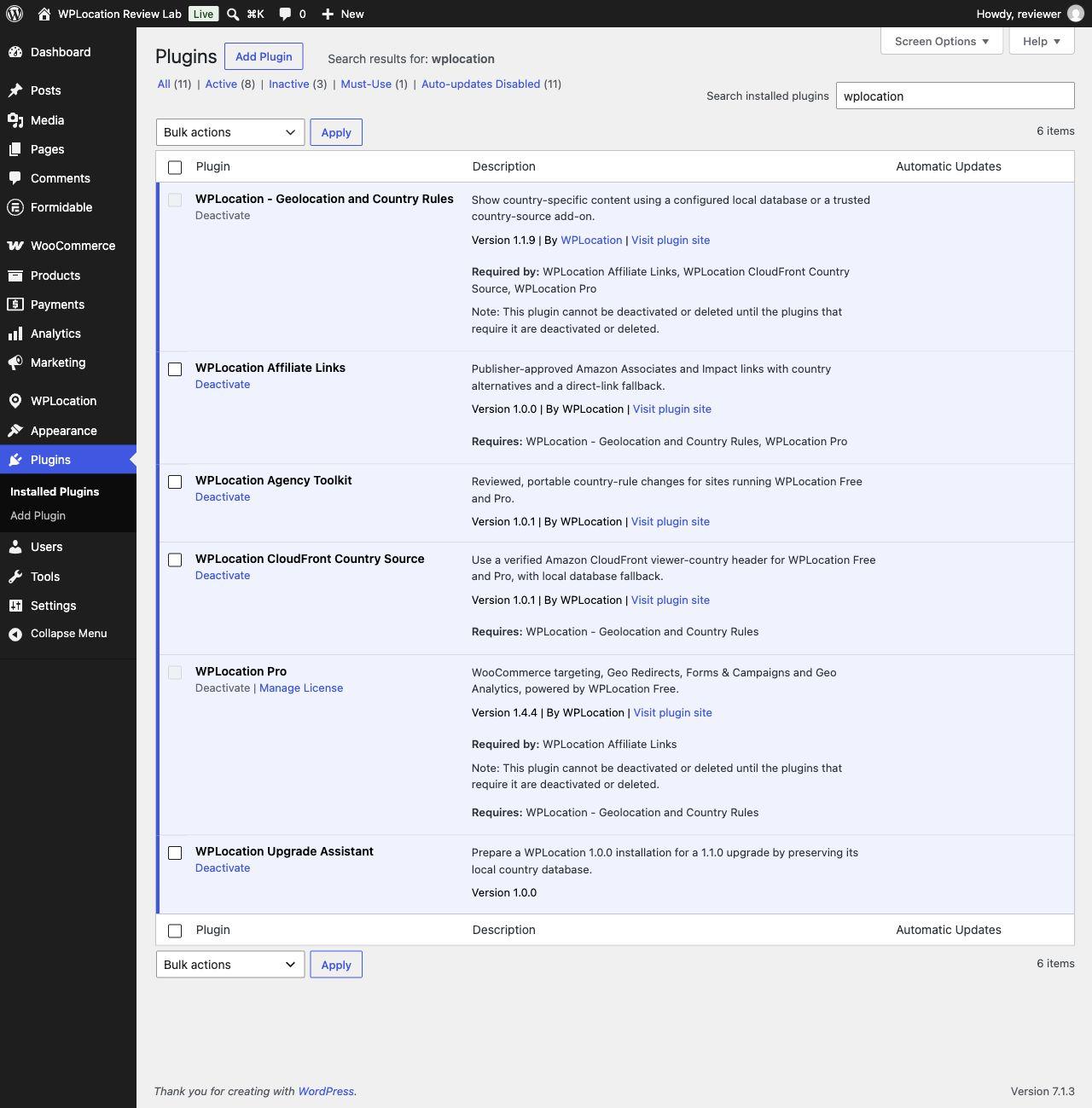
Paid downloads and the license key are different things. The ZIP installs the software; activating the purchase key connects the installation to update and support entitlement. Current separate Agency Toolkit and Affiliate Link Localization downloads do not issue a second key. The website states that newer separate add-on ZIPs are installed manually from the account; the free CloudFront ZIP also uses manual updates. Follow the current Pro installation and licensing guide rather than assuming every extension has an automatic updater.
Older installations need particular attention. The WordPress.org Free 1.0.0 submission is a distinct package awaiting approval, not the same build as website Free 1.1.9 and not the old standalone 1.0.0. Do not infer compatibility from the number alone. The current compatible directory edition supports Pro, but its source hooks do not support the present CloudFront add-on. Existing legacy installations should follow the migration guidance and verify retained rules before replacing files.
Country data: configure the source before the rules
WPLocation needs a country decision, and a localhost address naturally resolves to unknown. Free supports a locally maintained GeoLite2 Country MMDB. The database is not bundled with Pro, and a Pro purchase is not a MaxMind data account. You provide a supported, current database under your provider's terms, or configure the optional CloudFront source described below.
In WPLocation → Settings, either select an existing private MMDB path or use the MaxMind setup controls. The illustrated GeoLite2 Country setup guide explains the account, key, download consent, private directory and update controls. Keep the database outside the public web root. A publicly downloadable MMDB is an unnecessary exposure and should not be used as the production configuration.
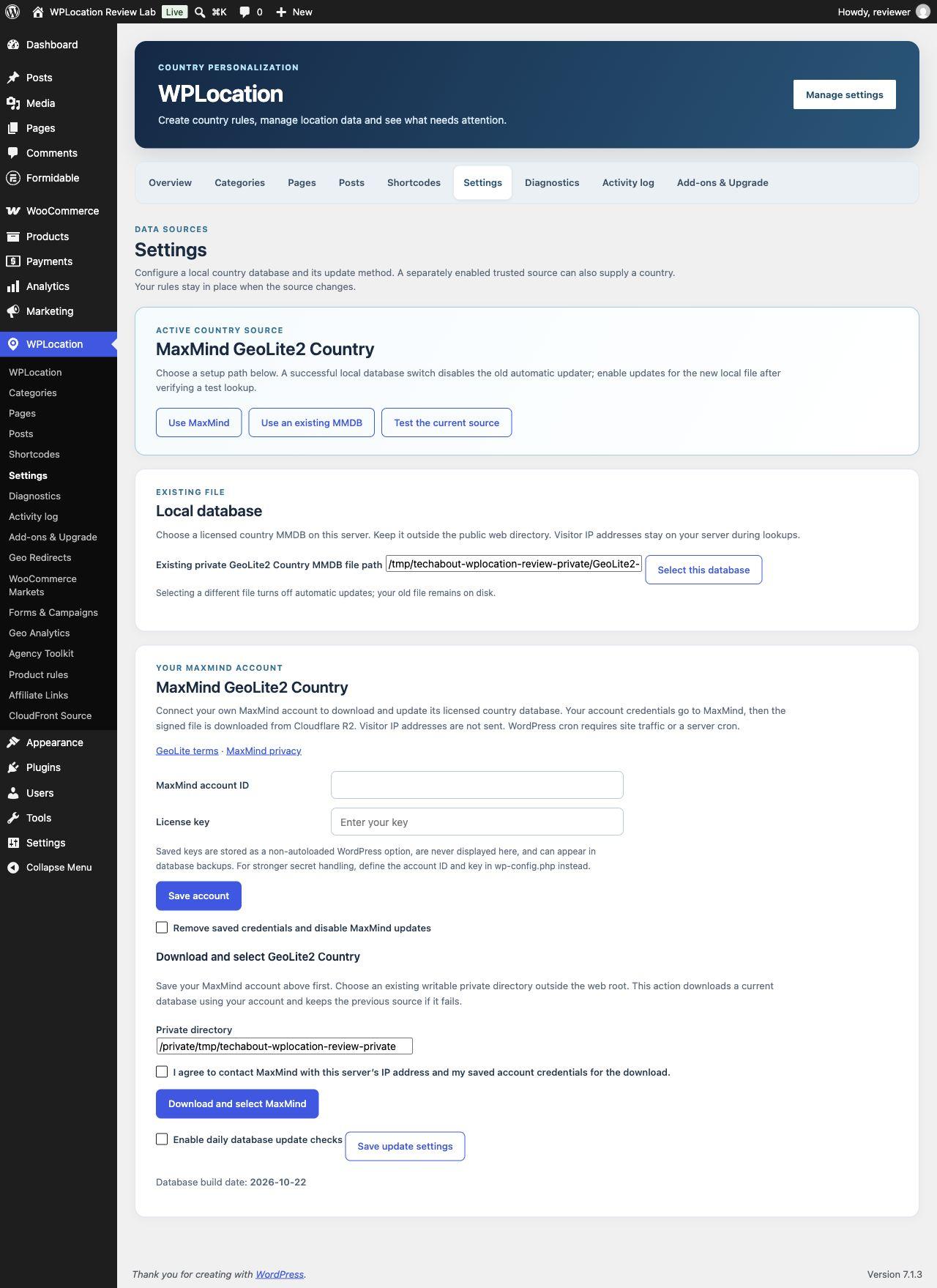
Next, open WPLocation → Diagnostics. Confirm that the file is readable and test representative addresses. A successful file check proves that the installation can read that source; it does not prove that every visitor will be classified correctly. VPNs, mobile networks, corporate gateways and stale data can change the result. Plan a useful experience for unknown visitors instead of treating unknown as an impossible state.
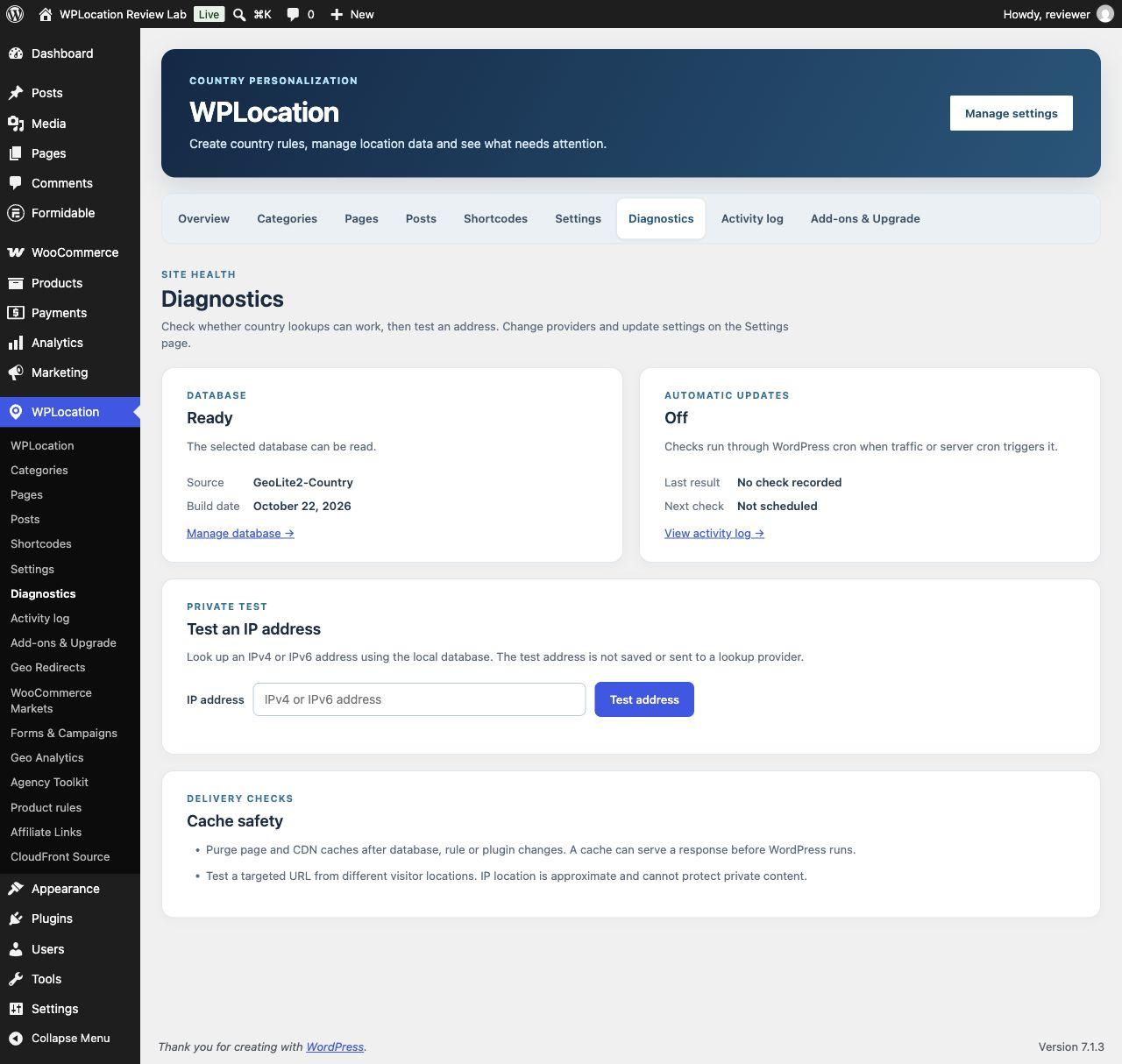
Local lookups do not require WPLocation lookup credits. That does not eliminate data-provider terms, hosting cost or AWS charges where applicable. DB-IP access and a managed WPLocation lookup-credit service are not included in the reviewed release.
Guide: target WordPress pages, posts and content sections
For an entire page, open WPLocation → Pages, choose the page and select an audience: everyone, only selected countries, or everywhere except selected countries. Search the country picker, make the selection and save. Use Check the saved result to test an allowed country, an excluded country and unknown. The preview evaluates saved settings; unsaved edits do not become a live rule merely because they appear in the editor.
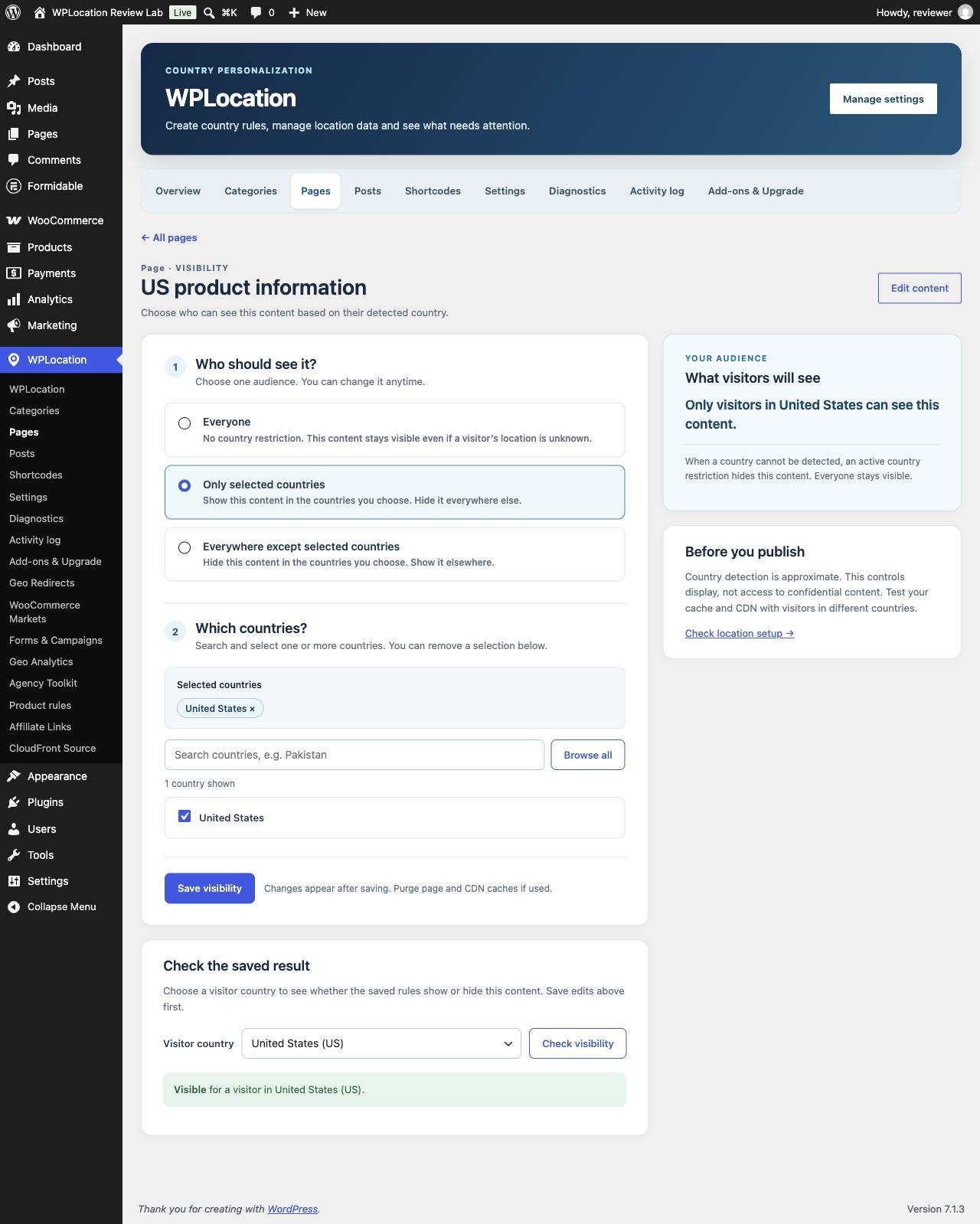
Posts and post categories follow the same broad workflow. A post's own rule does not automatically override a restrictive assigned category; the applicable restrictions must allow the visitor. This is useful for a regional publication section, but it also explains why changing only a post rule may not make that post visible. The blocked-content guide should be part of a site's rollout plan.
Target part of a page with a block or shortcode
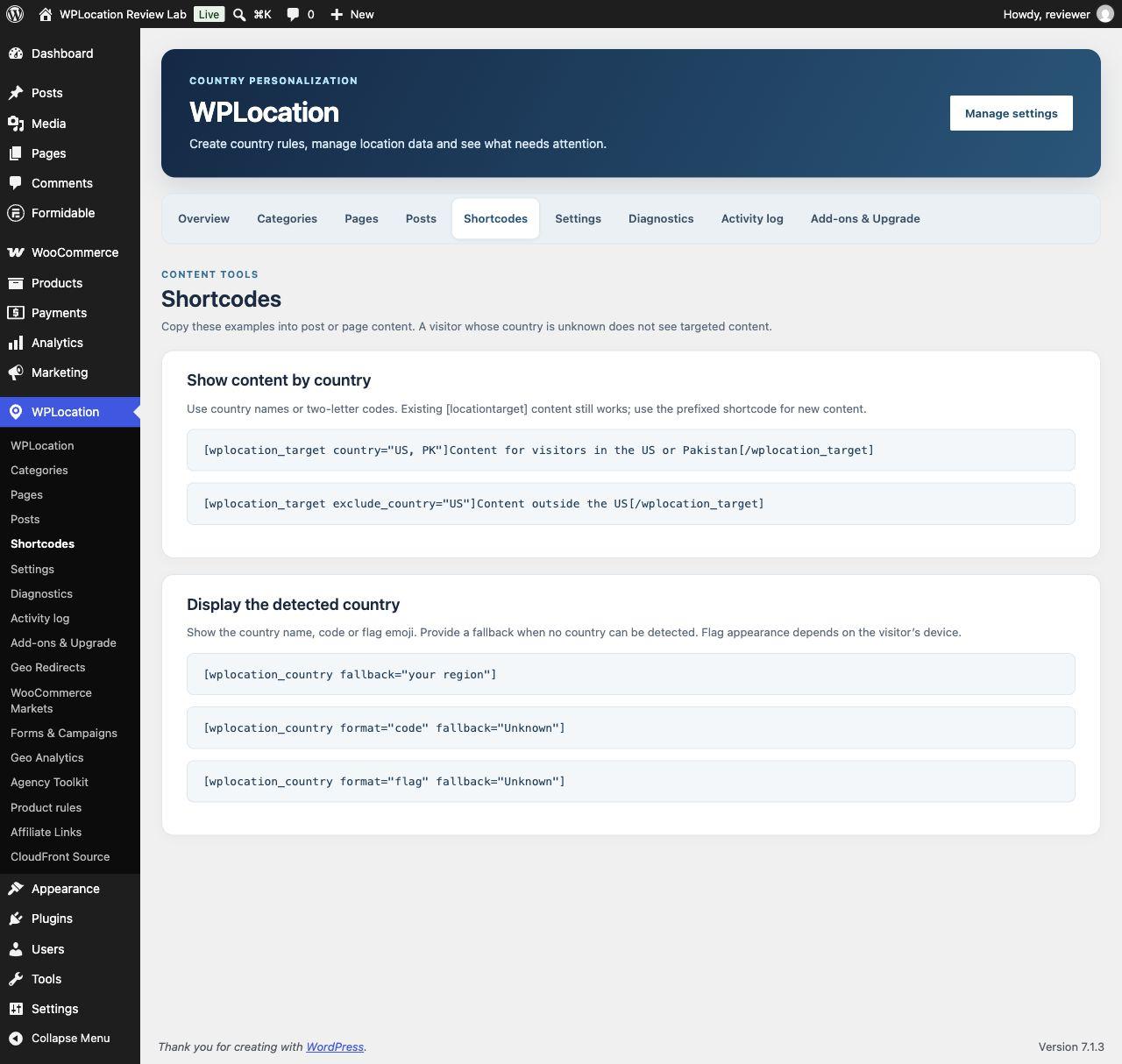
Use the Country Visibility block when a page needs a targeted section rather than an entire-page restriction. The prefixed shortcode is also useful for content editors and integrations:
[wplocation_target country="US"]
This message is intended for visitors detected in the United States.
[/wplocation_target]

[wplocation_country format="code" fallback="Unknown"]
The first example wraps content in a country condition. The second displays the detected country code or your fallback text. The website edition retains a legacy shortcode alias, but new work should use the prefixed syntax and check the exact edition being installed. In our HTTP tests, the US and UK sections appeared only for their matching simulated countries; an unknown visitor received neither restricted section.
Hiding content is a personalization decision, not a confidentiality boundary. Do not put private records or access credentials in content that relies solely on an IP-country rule. Use authenticated permissions for protected information.
Guide: WPLocation Pro product rules and WooCommerce Markets
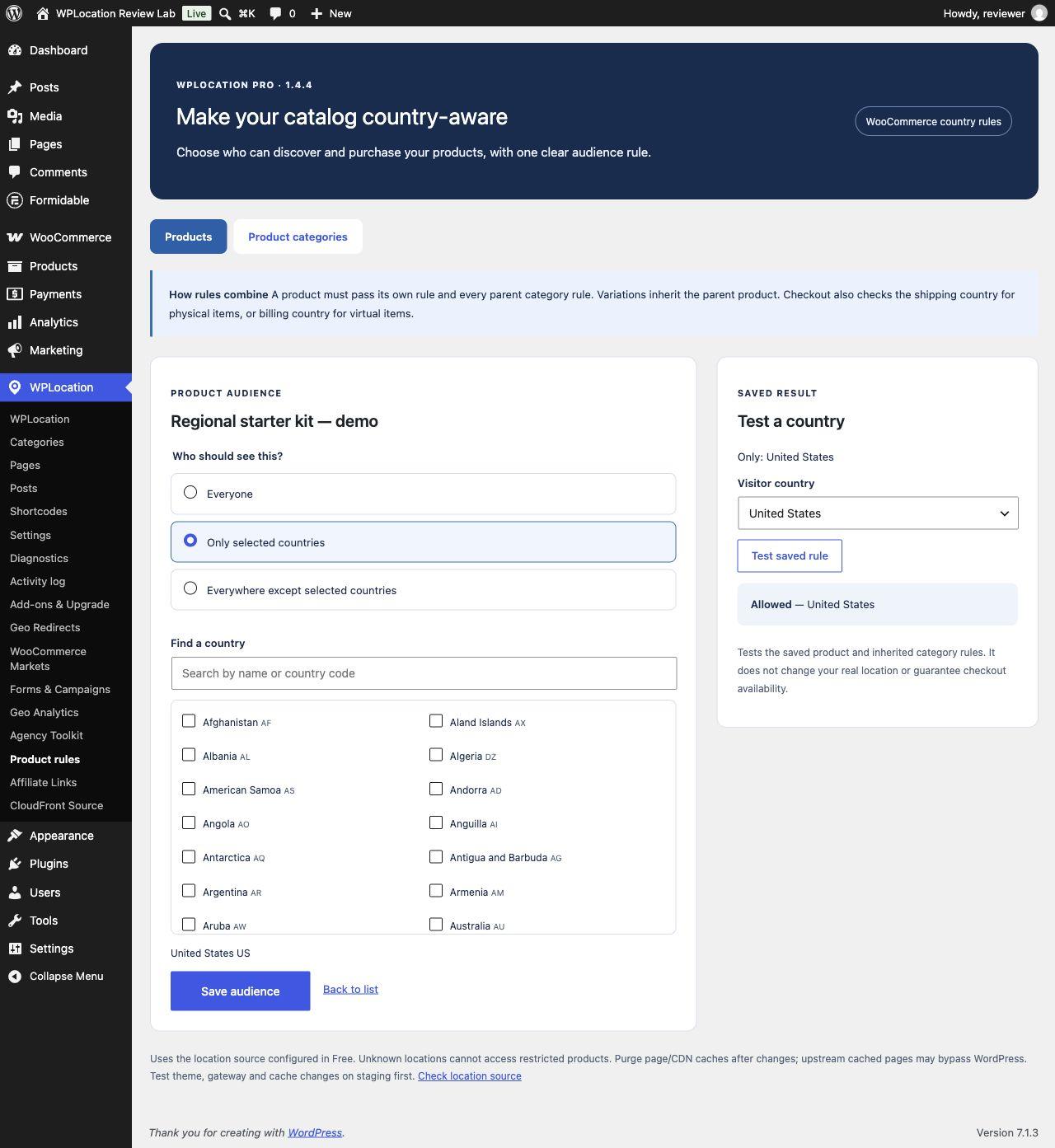
Restrict who can see or buy a product
Open WPLocation → Product rules, choose a product or product category and save its audience. Pro offers everyone, include and exclude modes with country selection. Its implementation applies restrictions across supported catalog queries, direct product visibility, add-to-cart, cart and checkout paths. A hidden catalog card alone would not be enough; a store also needs to consider direct URLs and existing carts.
Product rules and product-category restrictions combine. Variations inherit their parent product's rule. In our controlled checks, a US-allowed product became unavailable when its category excluded the US, then became available again when that category restriction was removed. Anonymous HTTP requests also confirmed the direct-product 200/404 outcomes described above. Those are narrower observations than an end-to-end paid checkout test.
Build a regional shop experience with Markets
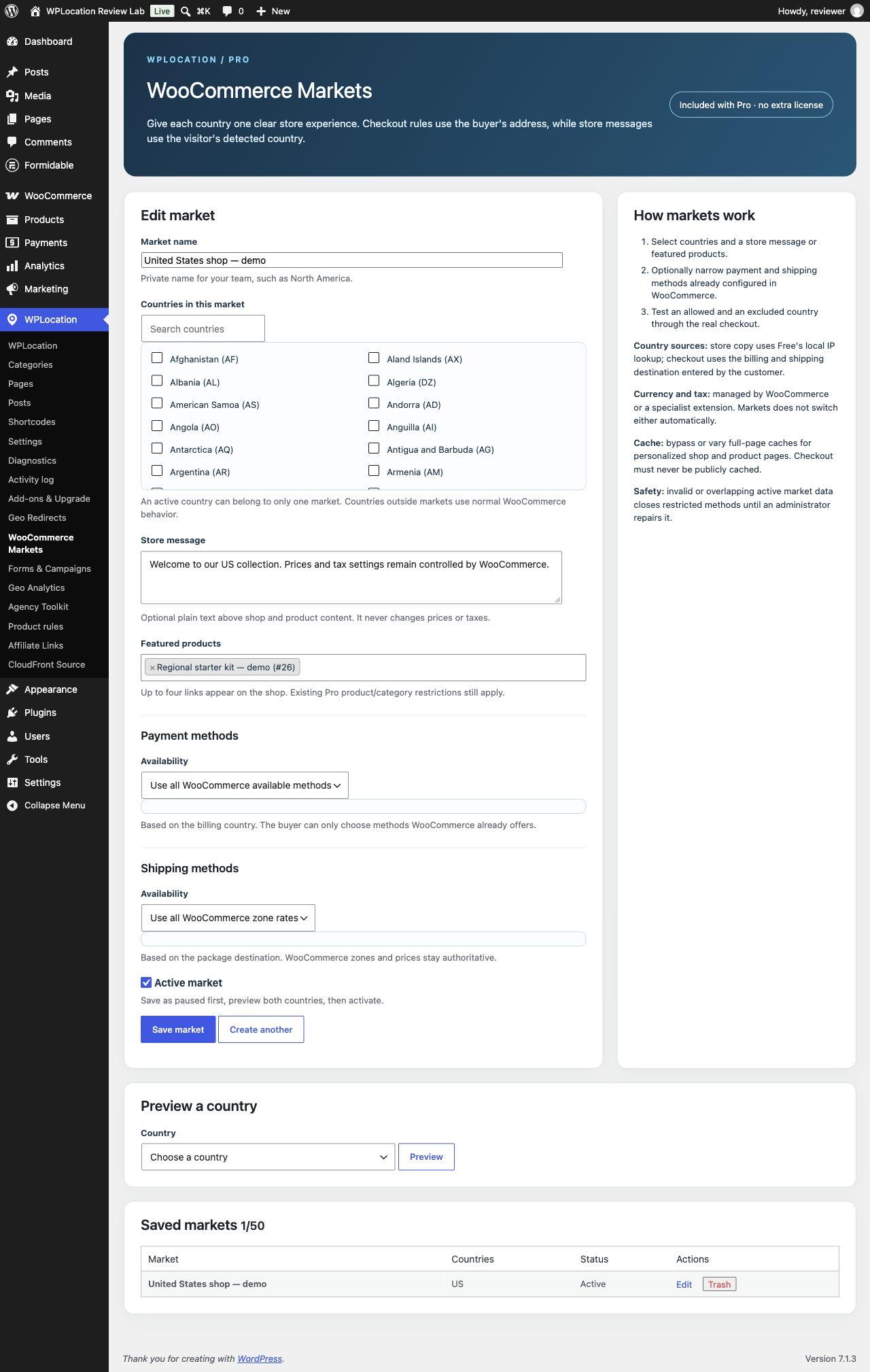
WooCommerce Markets adds regional shop messages, up to four featured products per market, and controls that narrow shipping or payment methods already configured in WooCommerce. Store messaging uses the detected country; checkout method decisions use the customer's entered billing and shipping destination. Those are different inputs, so test both.
- Create the necessary shipping zones and enable the relevant gateways in WooCommerce first.
- Create a market, choose its countries and add a short regional message or featured products.
- Leave methods unrestricted or select an allowed subset of configured methods.
- Save, preview the market and test overlapping-country scenarios.
- Walk through your actual checkout for supported and excluded addresses, including a visitor whose IP country differs from the shipping destination.
This is not automatic currency conversion, tax calculation or a WPML replacement. WPLocation does not translate the catalog or make tax-residence decisions. Choose it for country audiences and regional store behavior, while keeping those other responsibilities in their appropriate systems.
Guide: route visitors to a regional page
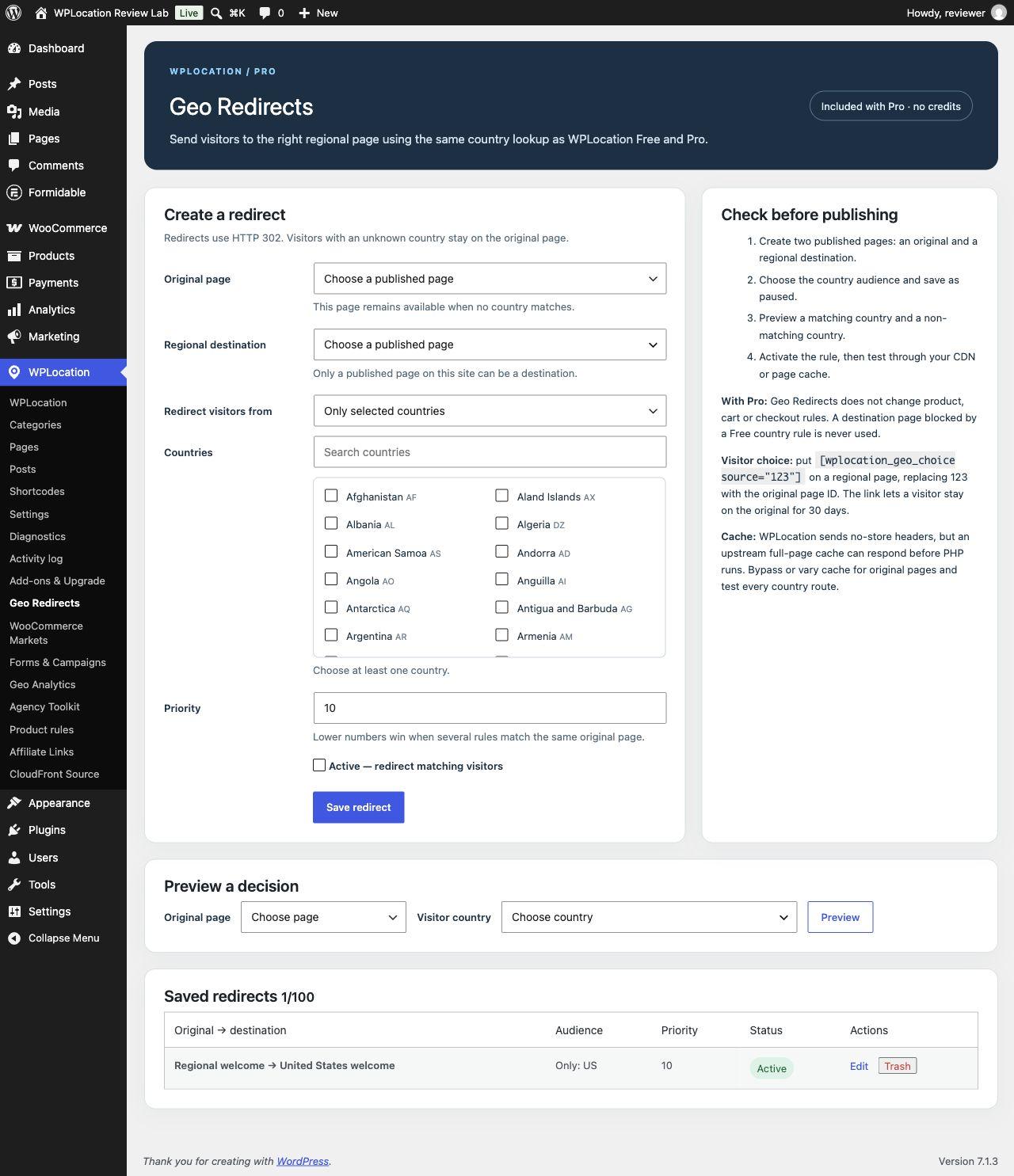
Geo Redirects is included in Pro. It routes between published pages using country audiences and priority, with a decision preview, loop protection and a visitor-choice mechanism. A useful example is a general information page that points a matching visitor to a maintained regional version.
Create the source and destination pages first. In WPLocation → Geo Redirects, choose both pages, select the audience and priority, then inspect the saved decision before enabling the redirect. Check the final destination, unknown-country handling and the ability to stay with the original experience. Avoid redirect chains that make navigation confusing or hide useful content from readers who want another region.
Country routing does not create translated pages, canonical relationships or hreflang by itself. Keep regional destinations accessible, maintain their own content and verify the rendered URLs and search metadata separately.
Guide: show regional offers or existing Formidable forms
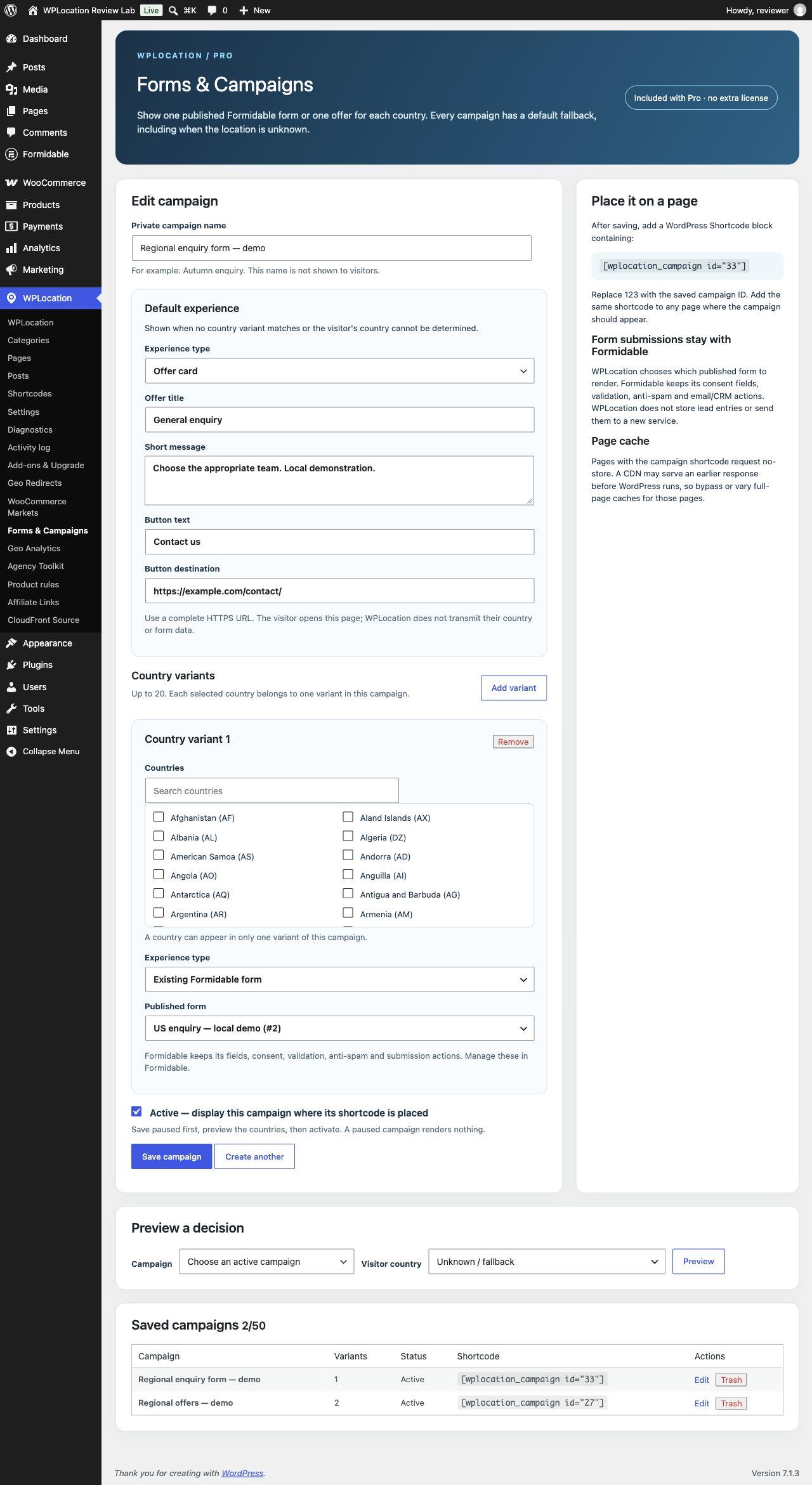
Forms & Campaigns is another included Pro feature. A campaign combines a required default experience with optional country variants. Each experience can be a native offer card or an existing published Formidable form. That makes it suitable for regional contact routes, country-specific calls to action and different enquiries on the same page.
- Open WPLocation → Forms & Campaigns and give the campaign a private descriptive name.
- Create its default offer or choose a published Formidable form.
- Add country variants and select the appropriate offer or form for each.
- Save and enable it, then preview matching, non-matching and unknown countries.
- Place the saved campaign shortcode in a WordPress Shortcode block and inspect the public page.
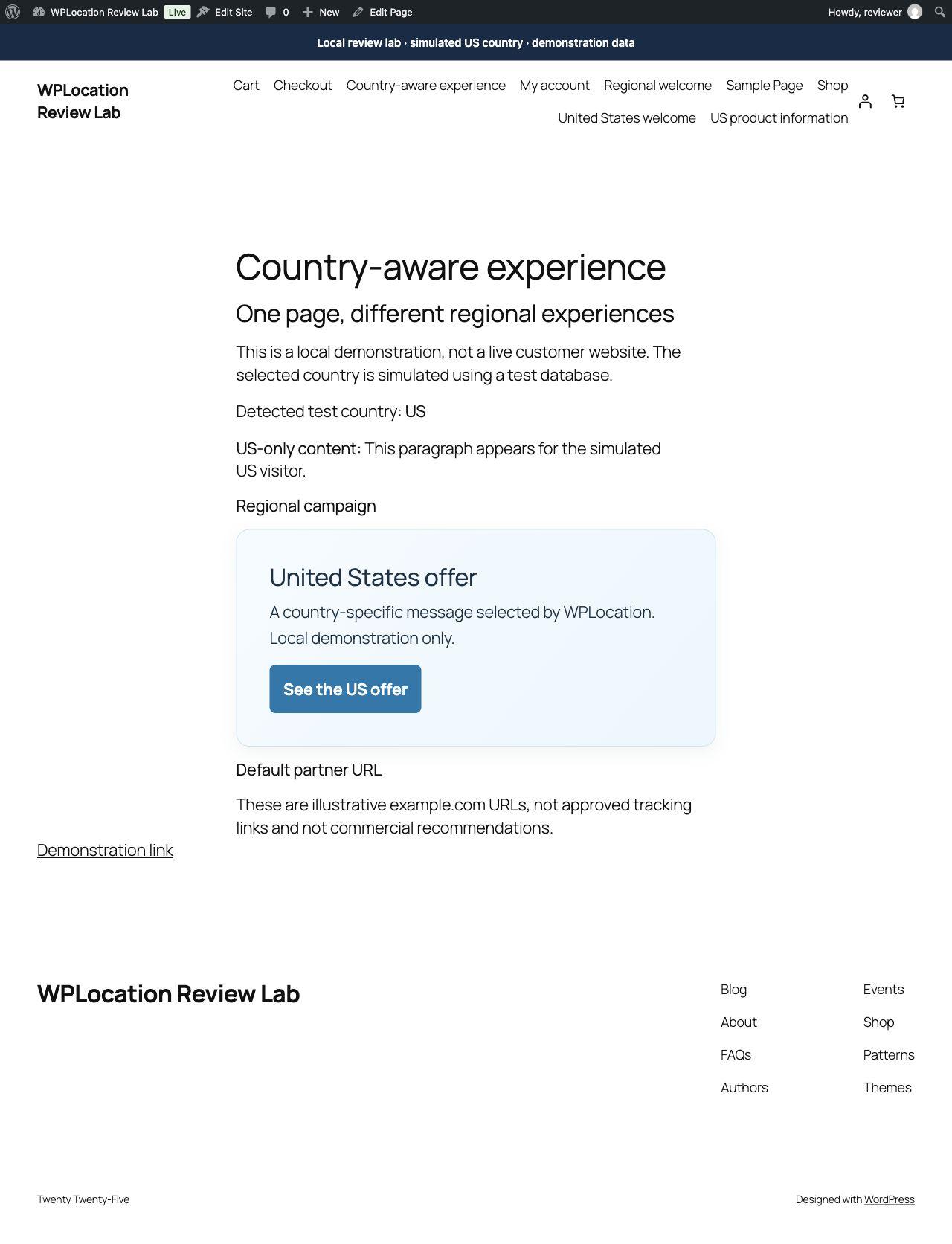
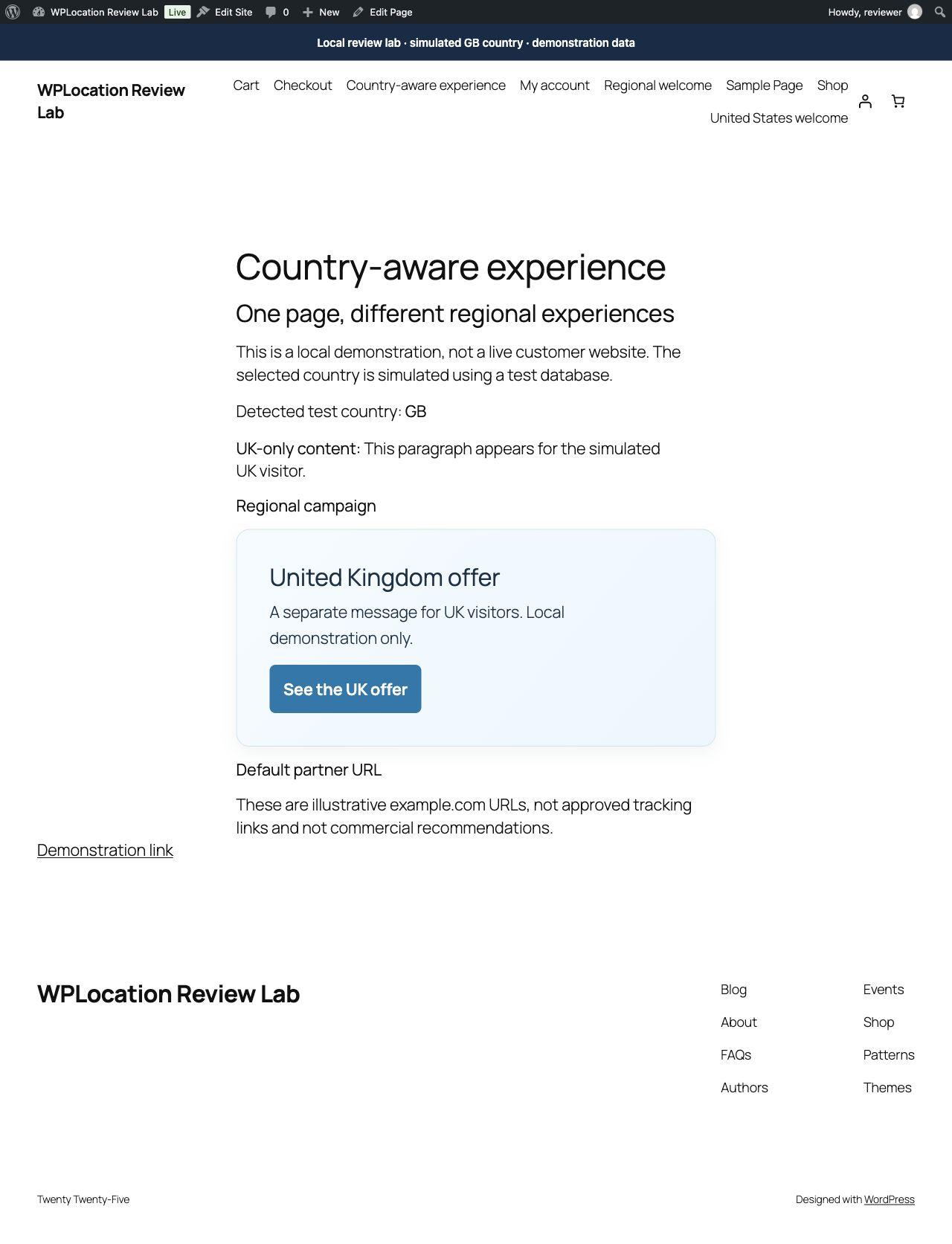
[wplocation_campaign id="123"]Replace 123 with the campaign's actual ID. In our test, the US and UK variants selected their own offers, an unknown country selected the default, and overlapping country assignments were rejected. A separate US variant successfully rendered an existing published Formidable form.
WPLocation is not a replacement form builder or CRM. Configure delivery, spam controls, privacy notices and entry handling in Formidable and your own processes. A successful render does not prove that an email reaches an inbox or a CRM receives a submission.
Geo Analytics: useful decision totals, with a limited scope
Geo Analytics is off by default. Enabling collection creates aggregate daily records for supported content decisions, redirects and campaign displays. The installed controls offer 7-, 30- or 90-day retention, CSV export and deletion. Reports use UTC dates.
The stored aggregate consists of date, country, event and total. Geo Analytics does not store visitor IPs, page URLs, form entries or order IDs in that aggregate table. This statement describes this component's storage, not every plugin, server log or analytics service on a WordPress site.
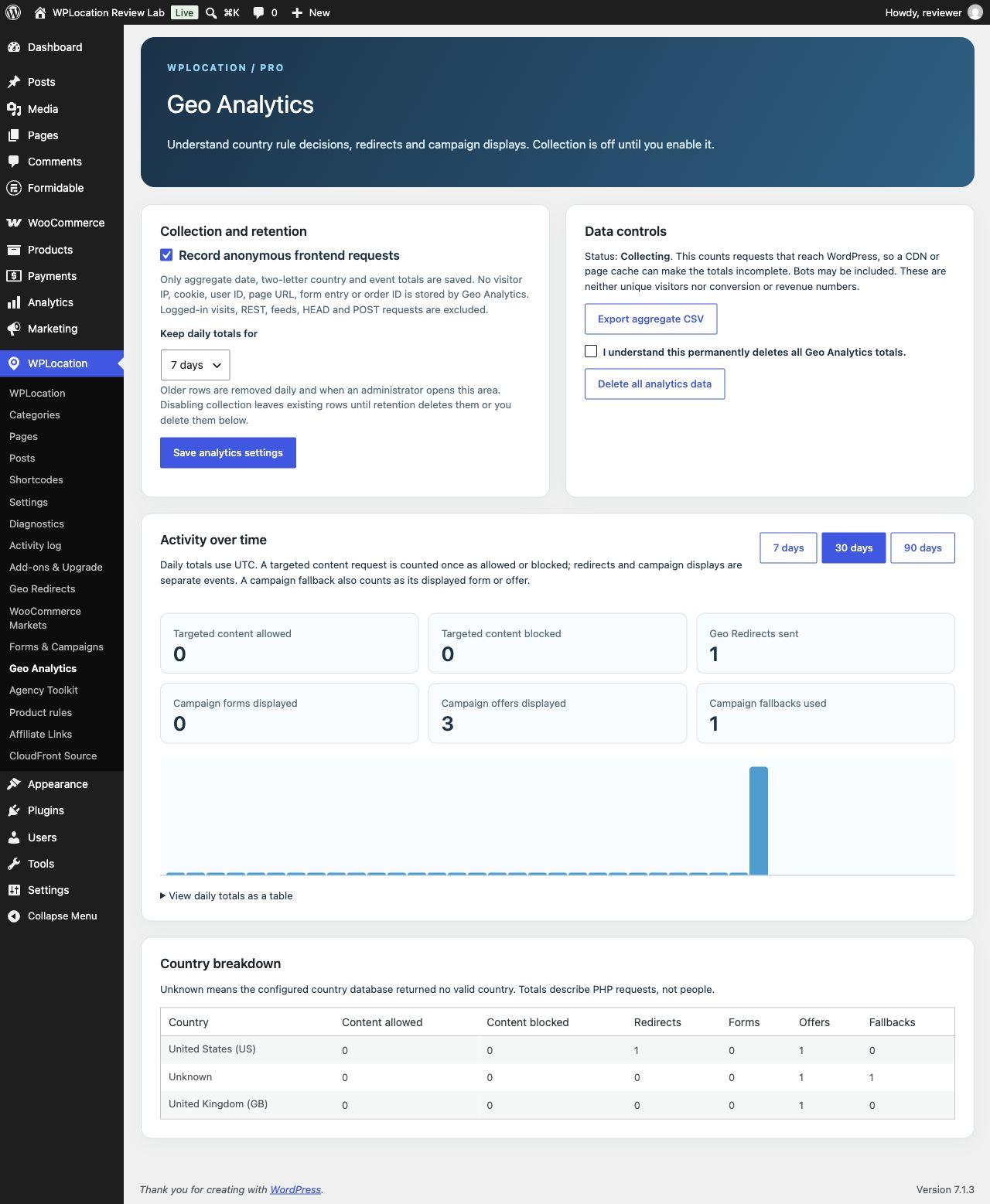
A cache can serve a response without reaching WordPress, while bots can generate requests that do reach it. Consequently, these totals should help diagnose personalization activity rather than replace a full audience or revenue analytics system. Logged-in visits, REST requests, feeds, HEAD and POST requests are excluded by the collection logic.
The separate WPLocation add-ons, explained
Affiliate Link Localization: country alternatives with a direct default
Affiliate Link Localization is included as a separate ZIP with current Pro, Agency and lifetime purchases. It accepts publisher-supplied Amazon Associates or Impact links. In manual mode, supply a default HTTPS destination and up to 30 country alternatives. Amazon OneLink mode keeps an approved Amazon URL and leaves marketplace handling to the configured Amazon service.
The shortcode puts a direct default link in the page HTML. A separate uncached, read-only AJAX lookup can replace the destination for a matching country. If JavaScript or the lookup fails, the default remains usable. This is a materially different cache pattern from server-rendered country-specific page content: the base link can be country-independent, while the resolution request must reach WordPress.
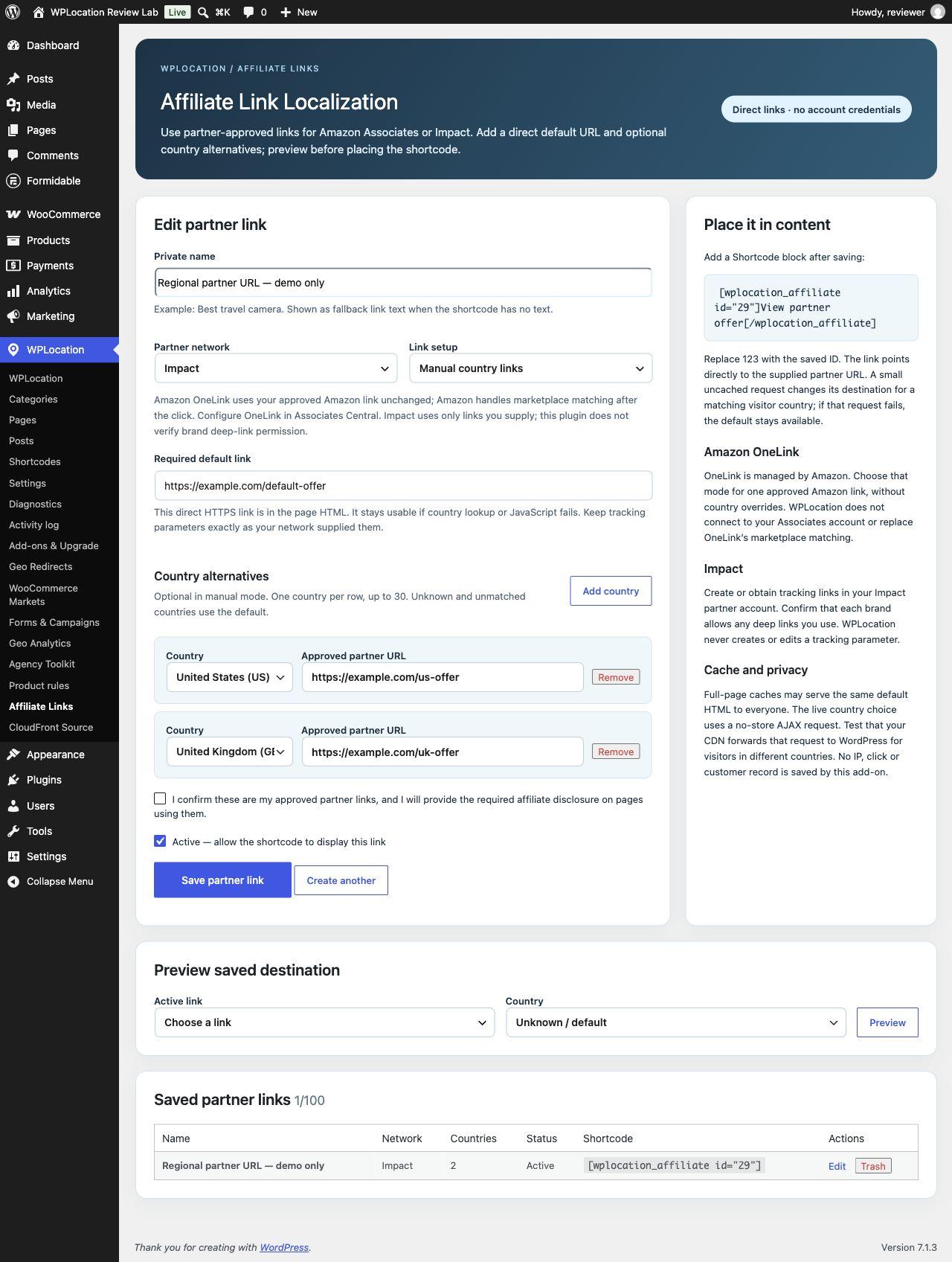
The add-on does not connect to your affiliate account, generate tracking tags, verify program approval, measure commissions or confirm a brand's deep-link permissions. You supply approved URLs and your disclosure. Its generated affiliate anchors use rel="sponsored nofollow noopener"; country localization does not remove the commercial nature of a partner link.
Agency Toolkit: supervised rule transfer, with a guarded restore
Agency Toolkit is for eligible Agency subscribers and both lifetime plans. Install it with Free and Pro on source and destination sites. Export the supported country rules from staging, upload the JSON on the destination, review the comparison, then confirm application after taking an independent backup.
It matches content using paths and slugs rather than assuming that database IDs agree. Missing or incompatible objects block the package. The one-step restore addresses the last import and refuses to overwrite rules changed afterward. In our same-site local transfer exercise, a reviewed package changed one product audience and restore returned that audience to its prior state. A missing destination and a stale preview hash were rejected.
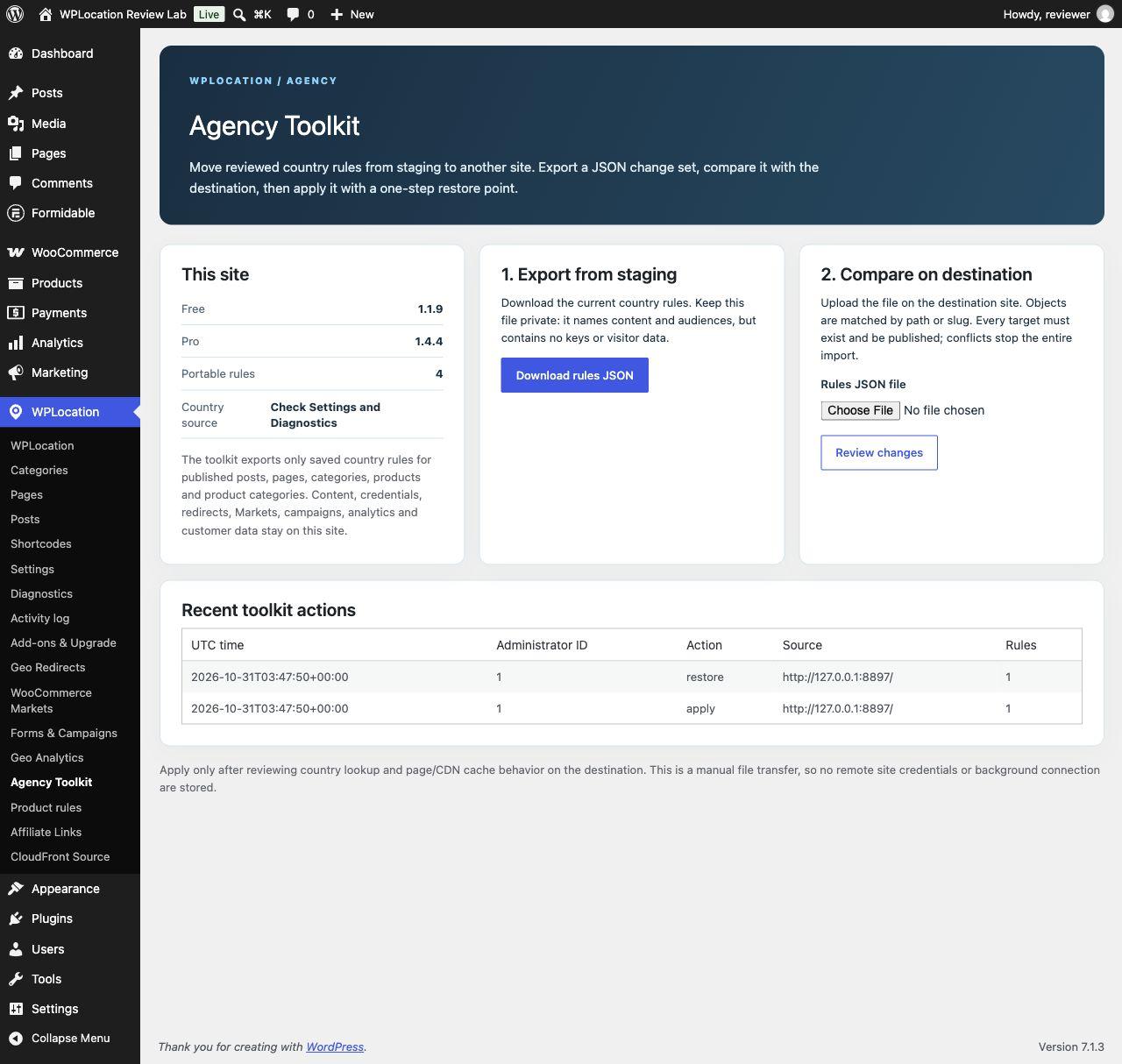
This is not a full-site migration or unattended deployment system. It does not move content, credentials, customer records, orders, analytics, Markets or campaign configuration. Treat exported paths and audience rules as private operational material, even though credentials are excluded.
CloudFront Country Source: optional infrastructure integration
The free CloudFront Country Source add-on uses trusted viewer headers from your own distribution. Use the current website Free 1.1.9 base for the setup described here. Pro is optional for the source itself; it is required for Pro features consuming that source.
- Install the separate add-on and open WPLocation → CloudFront Source.
- Generate an origin token and configure
X-WPLocation-Origin-Tokenas the distribution's custom origin header. - Forward
CloudFront-Viewer-CountryandCloudFront-Viewer-Addressthrough the origin request policy. - Save and explicitly enable the source in WordPress.
- Check a real distribution request, then confirm that a direct-origin request and a forged country header are not trusted.
- Test cache behavior. Forwarding a header does not automatically make that header part of the cache key.
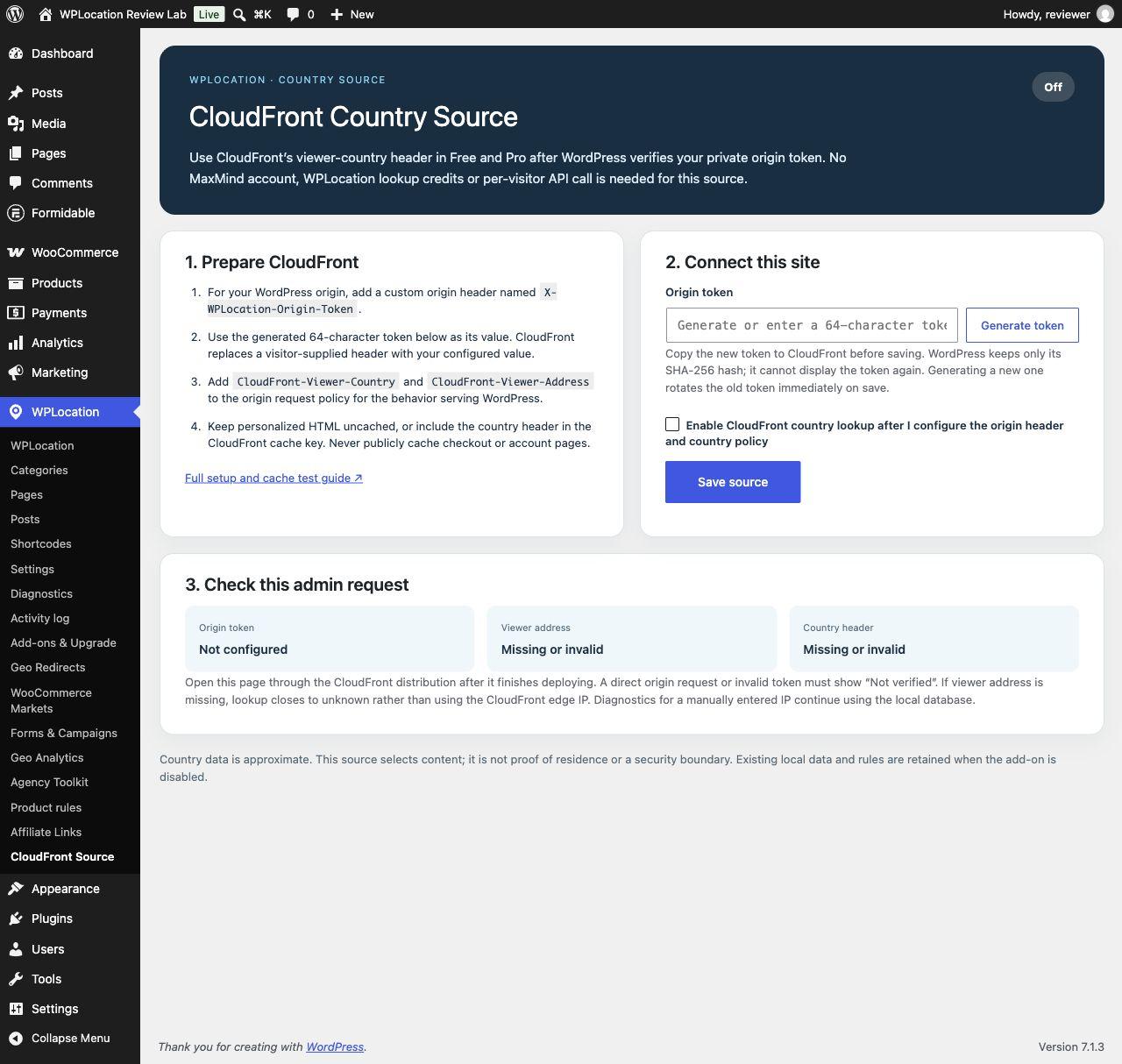
The source makes no outgoing AWS lookup request and does not require a WPLocation credit balance. It does require your own functioning distribution and deliberate origin and cache configuration. An invalid or absent trusted country header can fall back to the configured local database when a verified viewer address is available. Without that verified address, the result can be unknown rather than the edge server's country. See the CloudFront setup guide before deploying it.
Upgrade Assistant: relevant to migrations, not new-site setup
We also installed Upgrade Assistant 1.0.0 to inspect the migration utility. Its purpose is to prepare older standalone installations and their database configuration. A fresh Free-plus-Pro installation does not need it as a permanent feature. We did not run a legacy production migration in this review; back up an old site and follow the migration-specific instructions rather than substituting a new-install tutorial.
WPLocation pricing: which plan fits?
The following USD prices were displayed on the official pricing page on October 31, 2026. Review the current purchase terms and checkout before ordering; taxes or later price changes are not established by this snapshot.
| Plan | Price | Sites | Billing |
|---|---|---|---|
| Free | $0 | Free base plugin | No paid WPLocation license |
| Pro monthly | $9 | 1 | Monthly subscription |
| Pro yearly | $69 | 1 | Annual subscription |
| Agency monthly | $25 | Up to 5 | Monthly subscription |
| Agency yearly | $199 | Up to 5 | Annual subscription |
| Pro Lifetime | $599 | 1 | One-time purchase |
| WPLocation Lifetime | $999 | Up to 5 | One-time purchase |
For a publisher needing only country-specific posts or sections, begin with Free. A one-site store or publisher needing the included Pro features can evaluate Pro. Agency is relevant when managing multiple covered sites or needing the separate Toolkit. Both lifetime plans include current and future WPLocation add-on software for their covered sites when released, with updates and support for the product lifetime. A roadmap item is still unavailable until released; lifetime terms do not include a promised delivery date, hosted lookup credits or third-party charges.
The arithmetic on the current annual options is straightforward: 12 monthly Pro payments total $108, compared with $69 yearly; 12 monthly Agency payments total $300, compared with $199 yearly. That is a billing comparison, not a return-on-investment forecast. Cancellation stops future subscription renewals; installed country rules continue while compatible Free and Pro remain active, while paid updates and support depend on the entitlement. Read the seven-day refund conditions rather than assuming an unconditional refund or a trial.
Caching, troubleshooting and a practical launch checklist
Cache configuration is the most consequential deployment issue in this review. WordPress can make the correct country decision and still deliver the wrong experience if a CDN serves previously generated HTML before the plugin runs. Purging once after setup is not a substitute for defining how future country-specific responses are cached.
For server-rendered targeted pages, offers, redirects and store content, bypass full-page caching or use a correctly tested country variation strategy. Keep checkout and account routes out of public caches. For Affiliate Links, preserve its country-independent default HTML and keep the resolution request uncached. Verify the actual public hostname and distribution, not just a direct-origin test.
If a visitor gets the wrong result
- Everything resolves to unknown: inspect source readability, data format, trusted-proxy setup and the address being tested. Localhost itself is not a meaningful country-accuracy test.
- A page disappears: check its saved audience, unknown-country behavior and any applicable category restrictions.
- A product still cannot be purchased: inspect product and category rules, cart contents and the checkout address. Do not stop at the catalog view.
- A campaign shows the default: verify that it is active, the visitor matches a variant and any selected Formidable form is still available.
- An affiliate link stays on the default: inspect JavaScript and the uncached resolution request. Remaining on a valid default can be intentional failure handling.
- CloudFront is ignored: check the origin token and both viewer headers. Do not solve an untrusted header by broadly trusting arbitrary forwarded headers.
- A change works only when logged in: compare fresh anonymous requests, cache headers and the CDN path. Administrative previews and anonymous delivery are different checks.
Before a production rollout
Verify requirements and backups; use the current release ZIPs; activate Free before Pro; configure and maintain the country source; save a small rule; test allowed, excluded and unknown cases; then test the complete anonymous path through your theme, cache and checkout. Inspect the direct product URL, existing cart, form fallback, regional redirect and default partner link where used. Keep a recovery route for an administrator if a regional rule behaves unexpectedly.
There are also clear boundaries to the reviewed release. Reusable groups, schedules and bulk tools are future work. A hosted managed-lookup service is not available today. The present product is country targeting, not a promise of GPS precision, automatic multilingual SEO, legal-residence verification or higher conversion rates.
Questions before choosing a WordPress geolocation plugin
Do I need both WPLocation Free and Pro?
Yes. Free supplies the shared engine and editorial features. Pro extends it. Disabling Free pauses Pro country-rule enforcement; retain compatible versions of both.
Can I use WPLocation without WooCommerce?
Yes. Free's publishing controls do not require WooCommerce. Pro also contains regional redirects, campaigns and aggregate reporting. Its product rules and Markets require WooCommerce, and form experiences require a published Formidable form.
Does Pro include a country database or a paid lookup API?
No bundled country database or WPLocation managed lookup credits are included. Configure your own supported local GeoLite2 Country source, or use the optional CloudFront source with your own distribution.
Are Geo Redirects and Geo Analytics separate paid add-ons?
They are included in Pro 1.4.4, as are Markets and Forms & Campaigns. Affiliate Links, Agency Toolkit and CloudFront Country Source are separate ZIPs with the plan and infrastructure requirements explained above.
Will it work with every cache or international checkout?
That has not been established. Test your deployed theme, gateway, checkout type, proxy and cache. The local results in this review do not certify an arbitrary production stack.
Should I choose WPLocation?
Evaluate it if you want WordPress-native country audiences, already operate the required data or CDN infrastructure, and value keeping the reviewed configuration in WordPress. Start with one measurable workflow and the public demonstration, then test on staging. If your requirement is city-level precision, translation management, currency conversion, identity checks or a fully managed lookup service, assess that requirement separately before purchasing.
Our assessment is that WPLocation's shared engine and explicit defaults make a coherent foundation for country-aware WordPress publishing and commerce. The practical value comes from the workflow you configure and verify. The documentation hub, current Pro feature page and plan comparison are the next references to check against your own site.